WordPress Website Design and Development
There are a lot of website CMS platforms out there, but we embraced WordPress because of its open-source roots, extensibility, plugin library, and huge supportive community. Paired with a rock solid webhost and our proactive approach to security and performance, WordPress can handle just about anything.
WordPress can be customized and configured to meet almost any brand’s online needs, so it’s typically our go-to choice for small businesses, e-commerce sites, and even nonprofits. If WordPress isn’t a good fit, we’ll let you know… and we can build custom .NET sites too!
Why We Recommend WordPress
WordPress isn’t just the world’s most popular content management system. Seriously, WordPress powers more than 40% of websites on the internet. It’s also one of the most flexible website platforms ever built. Unlike proprietary website builders like SquareSpace, Wix, Webflow, etc., WordPress gives you complete ownership of your website. You’re never locked into a single provider, your content belongs to you, and your website can continue evolving as your business grows.
WordPress adapts with you. You can start with a five-page brochure site, then add e-commerce, a blog, some events, and a staff directory, all without having to start over. Five pages or five hundred pages, it’s all gravy.
- You own your website
- Flexible and scalable
- Excellent for SEO
- Thousands of integrations
- Easy content management
- Open-source platform
- Built for long-term growth
Some examples of our WordPress sites:
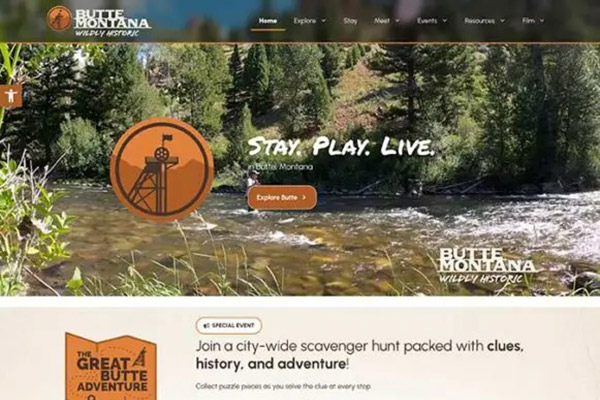

Visit Butte Montana
Nestled in the grandeur of the Rocky Mountains of Southwest Montana, between Yellowstone and Glacier National Parks, Butte is Montana’s most unique city offering small-town charm with a big city feel. The Butte Tourism Business Improvement District needed a website that matched the adventure and exploration feel of Butte and the surrounding Montana area.
View Project

For the Love of Kids & Camping
This heart-led project needed more than a website. It needed to tell a story. We combined e-commerce tools with impactful imagery to help drive product sales, all while keeping the mission front and center: giving hope to kids battling cancer.
View Project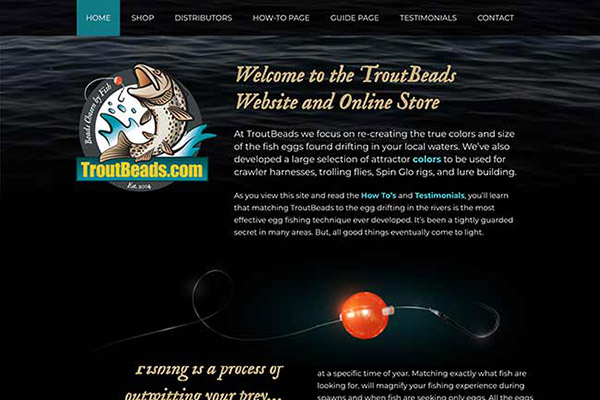
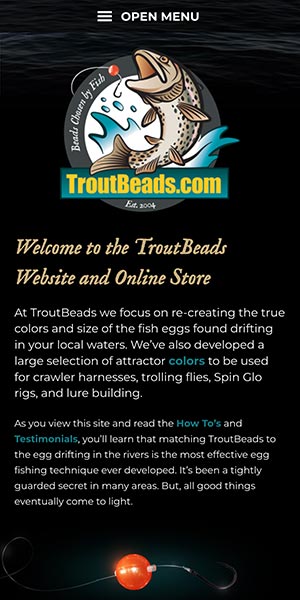
TroutBeads.com
This Minnesota small business has been manufacturing and selling the popular trout fishing beads for decades, and we helped them create an online presence to educate anglers, connect with distributors and fishing guides, and sell quality products.
View Project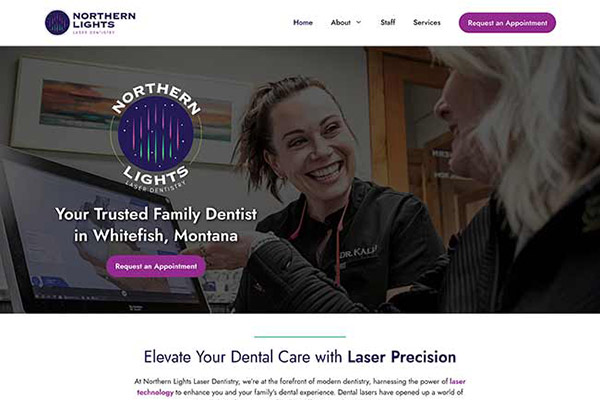

Northern Lights Laser Dentistry
We brought this local dental practice into the digital spotlight with a clean, accessible site that’s as easy to navigate as it is to trust. With on-site SEO, engaging content, and a thoughtful user experience, we helped them connect with new patients—online and in person.
View Project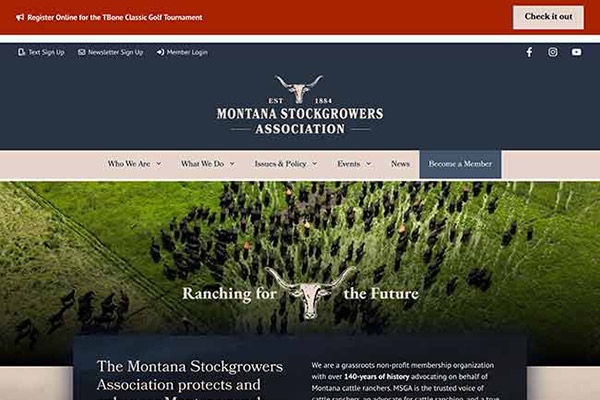

Montana Stockgrowers Association
With deep roots in Montana’s ranching heritage, this organization needed a site that honored tradition while improving communication. We refreshed their design, streamlined functionality, and made it easier for members and the public to access vital resources and engage with their mission.
View ProjectWordPress Websites Shouldn’t Keep You Up at Night
Let’s address the elephant in the room.
WordPress is one of the most targeted platforms on the internet. Not because it’s insecure, but because it’s incredibly popular. The difference isn’t WordPress itself. It’s how the website is built, hosted, maintained, and monitored. At Tempest, protecting our clients’ websites is part of the job, not an afterthought. Every WordPress website we manage benefits from a layered security approach that includes:
- Secure managed hosting
- Content Delivery Network (CDN)
- Web Application Firewall (WAF)
- Brute force login protection
- Daily WordPress core updates
- Daily plugin and theme updates
- Uptime monitoring
- Activity logging
- Multi-factor authentication
- Trusted, vetted plugins only
We don’t install plugins simply because they exist.
We don’t install plugins because they’re trendy.
We install them because they’re the right solution.
This feels like it deserves a special mention, because it’s one of the biggest issues we see with WordPress sites. Every plugin introduces new code, new maintenance requirements, and potential security risks. We carefully evaluate every plugin before it ever reaches a client’s website. Because the best security strategy isn’t fixing problems after they happen. It’s preventing them in the first place.
Content Management That Doesn’t Require a Web Developer
You shouldn’t have to open a support ticket every time you need to change a sentence.
That’s why we build WordPress websites that are intuitive for real people, not just developers. We use WordPress’s native Block Editor alongside carefully selected page-building tools to create reusable layouts, templates, and content patterns that make editing simple. Need to create another staff profile? Publish a news article? Add an event? Launch a landing page?
You’ll already know how. Our goal is simple: give your team the confidence to manage everyday content while keeping the overall design consistent and professional.
- Reusable templates & Block Patterns
- Custom page layouts
- Drag-and-drop editing where appropriate
- Consistent branding
- Flexible landing pages
- Easy media management
Performance Matters
WordPress isn’t slow. Bad WordPress websites are slow. Performance impacts everything from user experience to SEO rankings and conversion rates. That’s why performance is considered during every stage of development. We optimize:
- Images and video
- Caching and CDN
- Scripts and Stylesheets
- Core Web Vitals
- Lazy Loading
Built for Search Engines
A beautiful website doesn’t help much if nobody can find it. WordPress gives us an excellent foundation for search engine optimization. We build every website with SEO best practices in mind, including:
- Clean URL structures
- Optimized metadata
- XML sitemaps
- Schema markup
- Strong Internal linking
The Tempest Technologies difference
We’ve spent more than 27 years building websites that solve real business problems. Of the hundreds of sites we’ve built, the majority have been on WordPress. Our team doesn’t disappear after launch. We continue partnering with clients through hosting, security updates, content support, performance improvements, SEO, analytics, and digital marketing.
Whether we’re maintaining a five-page website or supporting enterprise WordPress installations serving thousands of visitors every day, our philosophy stays the same:
Build it well. Protect it. Keep it fast. Help it grow.
Because a website should be an asset, not another thing on your to-do list!
Send Us a MessageFrequently Asked Questions
We’re not gonna throw shade here. Different platforms work for different situations, and arguably you could build the same quality website in all three places. What we consider the WordPress differentiator is its open source roots, meaning it’s a community-built product that will always be free and collaborative. Other builders like Wix, Squarespace, and Webflow are fully fleshed out platforms that offer great services and capabilities, for a price (ok a little shade). Heck, even WordPress.com has a managed hosting and building platform, but the difference is they offer a separate self-hosted option for free.
Yes and no. WordPress core (meaning, the core code that makes up the functionality of WordPress without any themes or plugins) is pretty solid, but NO software is 100% bug-proof and vulnerability-free. WordPress developers don’t want to ship compromised software… and they are generally very active and support their product. That being said, the main reasons why WordPress sites get hacked are:
- Poor password strength for admin users (or just poor password protection such as sending passwords over text, email, etc.).
- Plugins or themes that slip out of date and aren’t monitored or patched regularly by website owners.
We can minimize the risk by securely generating and storing strong passwords, and keeping everything up to date as often as possible. If something does slip through the cracks (something outside our control such as a core vulnerability, or a successful phishing attempt for a client user account, or a plugin distributor vulnerability) we lean on our regular backups, uptime monitoring, and site activity logs to nail down what happened and when, and get things back up and running ASAP.
Ever heard the old adage about when is the best time to plant a tree? The answer is 50 years ago, and today. WordPress updates should be applied as soon as possible when they are released. We maintain a bulk update schedule that runs daily for all our WordPress websites, and then do a resulting quality and uptime check.
WordPress core releases small updates pretty regularly, and major releases 2-3 times per year. We do sometimes hold off on updating to new major versions for a while just to make sure all the plugins have had a chance to do any needed compatibility updates. It’s also very common for a followup minor release to come out within a few weeks of a major one that patches some bugs and security issues.
Plugins release updates constantly, and the frequency depends on how complex the plugin is, how big the plugin developer team is, and how dedicated they are to supporting it. It’s not uncommon for us to see updates ready every single day.
If you’re updating things yourself, be sure to have a quality check process in place where you can sniff out any visual issues, or broken connections to other systems like Google Analytics, forms, etc.
It’s kinda rare, but it happens. The first thing to do is NOT panic. If your site is hosted with Tempest, chances are we know about a plugin issue pretty quick after it happens, and we’ll take care of site recovery, do an analysis of the plugin’s naughtiness, and will rollback to a previous version or find an alternative for you.
What to do really depends on the plugin, and how “broken” the site is. Some general advice:
- If you know which plugin is being naughty, deactivate it. If the site is SUPER broken and you can’t access the admin dashboard, then you can deactivate a plugin by accessing the site files via FTP, and rename the offending plugin’s directory folder to something else, like “plugin-name-here_deactivate“.
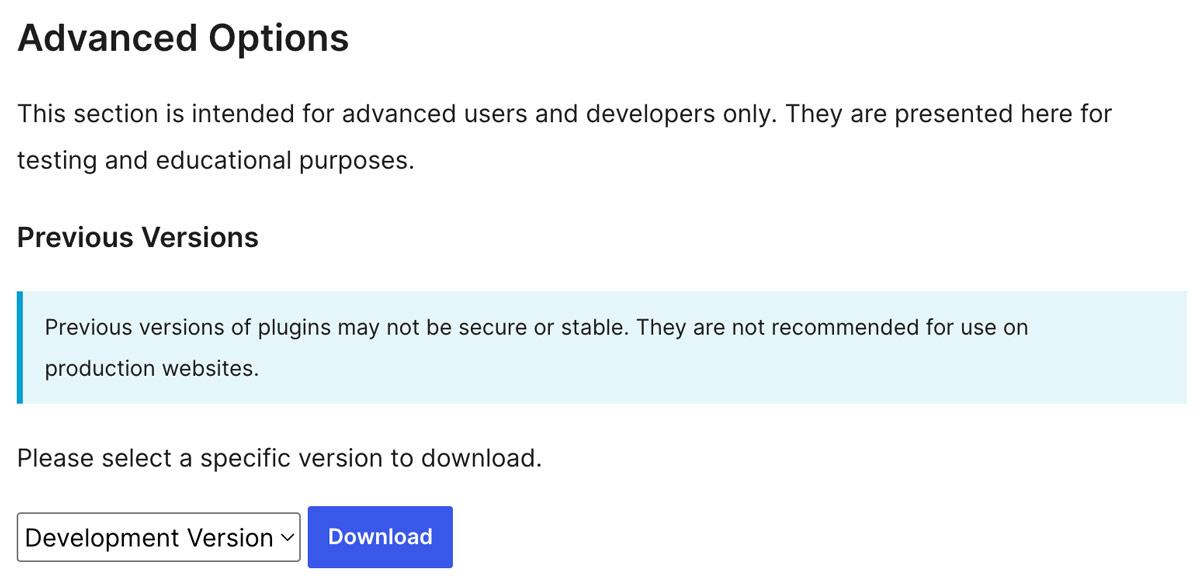
- If the issue is related to a recent plugin update, then you can download a previous version from the WordPress plugin repository (if that’s where you originally got it from). Find the plugin at https://wordpress.org/plugins/, click the “advanced view” link, then scroll down to find the advanced options where you can select and download a previous version. Example screenshot:
- Reach out to the plugin developer in the support section. If the plugin broke your site, there’s a decent chance it broke other sites too, so the support forum will likely be the place that they communicate with website owners.
- Evaluate if the plugin is worth the trouble, and if not find an alternative. There’s been some situations where we’ve had to shift to a different plugin when we lost confidence in a developer due to repeated issues.
The other most common reason for a plugin breaking your site is a conflict with an existing plugin. If that’s the case, you can deactivate other plugins then reactivate them one at a time to find who’s not getting along. After that, reach out to the plugin developers to try to find a solution. It can also be helpful to check error logs to nail down exactly what’s complaining and where.
Again, if you’re a Tempest hosted website, we’ll take care of it for you 🙂
We sure can! We’ve built enough websites that we’ve seen almost everything. However, maintaining a site that someone else built does come with some challenges, and we would want to do an audit and analysis of the site to make sure it’s compatible with our managed hosting environment. If we can’t confidently support the site from a security and performance standpoint, we might suggest a rebuild.
Absolutely. Part of our philosophy when building WordPress sites is to give our clients as much or as little freedom as they want. Some clients want to be able to touch everything, and some prefer us to handle the reins. Both are valid and doable! Our process for website launch and training:
- Around the time of site launch, we will provide a walkthrough of all admin sections that the website owner wants to manage.
- We will provide training materials and references in the form of in-person training, downloadable materials, or video recordings.
- We’ll do as much or as little hand holding as the website owner wants, and are always ready to jump in and help if there’s an oops, or there’s just not time and bandwidth and the owner needs us to take changes off their plate.
Many of our hosting plans include built-in time for making updates, adding new functionality, or doing a bit of design and layout work. We have found that a retainer is popular for busy businesses and non-profits.
We definitely can, and have done this many times before! Generally, this just involves scraping content and images from the front end of your current website and rebuilding in WordPress. If your site is already WordPress and it just needs rebuilt, there are lots of ways to export content and data in bulk then import it back into the new build, or generate a backup and restore it on our host.
As part of the migration, we give a lot of thought to information architecture, and map out a plan and strategy to bucket content types together and build any necessary custom metadata (like a blog vs portfolio vs. staff directory).
That’s a big fat it depends! Website design and development pricing depends on several factors, including:
- The size of your site (a few core pages vs. dozens of detailed sections).
- The complexity (think simple brochure site vs. full e-commerce, membership portals, or enterprise-level builds).
- Features and integrations, like event calendars, donation forms, blogs, or third-party systems.
- Content and visuals – are you bringing your own assets or would you like help from Tempest with copywriting, photography, or video?
Most of our small website projects start around $2,800, but we’ll walk you through the variables that can impact pricing so there are no surprises. All of our estimates based on your website goals will be wrapped up in a proposal that clearly explains it all. No confusing jargon, no hidden fees.
You bet it can. WordPress is engineered to handle websites that have a dozen pages or hundreds of pages. It can support connections to other systems, advanced functionality, and extreme visitor bandwidth. We’ve built some pretty complex WordPress websites, and as long as you have a solid hosting infrastructure, sufficient server resources, and manage performance through optimization and caching, there are not really any limits.
We’ll get a feel for your site structure, size, complexity, and estimated traffic to plan for the necessary resources. That being said, depending on your project and CMS needs, we may suggest a custom .NET site if we feel that is a better fit.
Out of the box, WordPress includes lots of optimizations for SEO. On top of that, there are some great WordPress plugins that enhance SEO and allow site owners to really tweak and optimize content and metadata.
Some core SEO benefits of WordPress:
- Clean semantic URL structure: Using “pretty permalinks” in WordPress, you can have customized page URLs that are human-friendly and not a mess of URL parameters and alphanumeric IDs (example: mysite.com/about-us/ vs. mysite.com/?p=54gs3).
- Organized Code structure for content types: WordPress comes ready to build pages and posts, and they each get a solid content structure and organization. For pages, you can set a page parent for hierarchal page structure, and for posts you can have categories and tags that automatically build archive pages ready for crawling and indexing by search engines and AI Large Language Models. HOWEVER, depending on those archive pages we may suggest disallowing crawling if they are thin or less valuable.
- Semantic HTML: The WordPress block editor uses clean semantic HTML when building layouts. There are nice little touches like defaulting to an h2 heading tag when adding to a page so you don’t have more than one h1 on a page.
- Image alt tags: Not just an SEO benefit, the WordPress media library allows you to describe images in an alt tag that appear in the code when published on a page. This helps search engines and LLMs understand the images, and their context within the page. Bonus: alt tags really help people out that that have poor vision and are using a screen reader.
On top of of that, if you install a SEO plugin you’re really cooking with gas. Popular plugins such as All in One SEO (our favorite), Yoast SEO, Rankmath SEO, and The SEO Framework all give you a crazy amount of extra tools and automatic optimizations for search engines and AI chatbots.
That’s kinda our whole thing.
You can find our hosting plans on our website design page. Long story short, we pride ourselves on our managed hosting infrastructure and support systems. We don’t build something then abandon it. Every site we host gets the royal treatment with daily backups, daily maintenance updates to plugins and themes, security and activity monitoring, and CDN and caching.
On top of that, most of our hosting plans include built-in time for our developer team to make changes for you. Need content updated, or an image swapped out, or a new form? A real live human is only a phone call or email away.
Other stuff we’re really good at:
we are such stuff as dreams are made on
William Shakespeare, “The Tempest” – Act 4